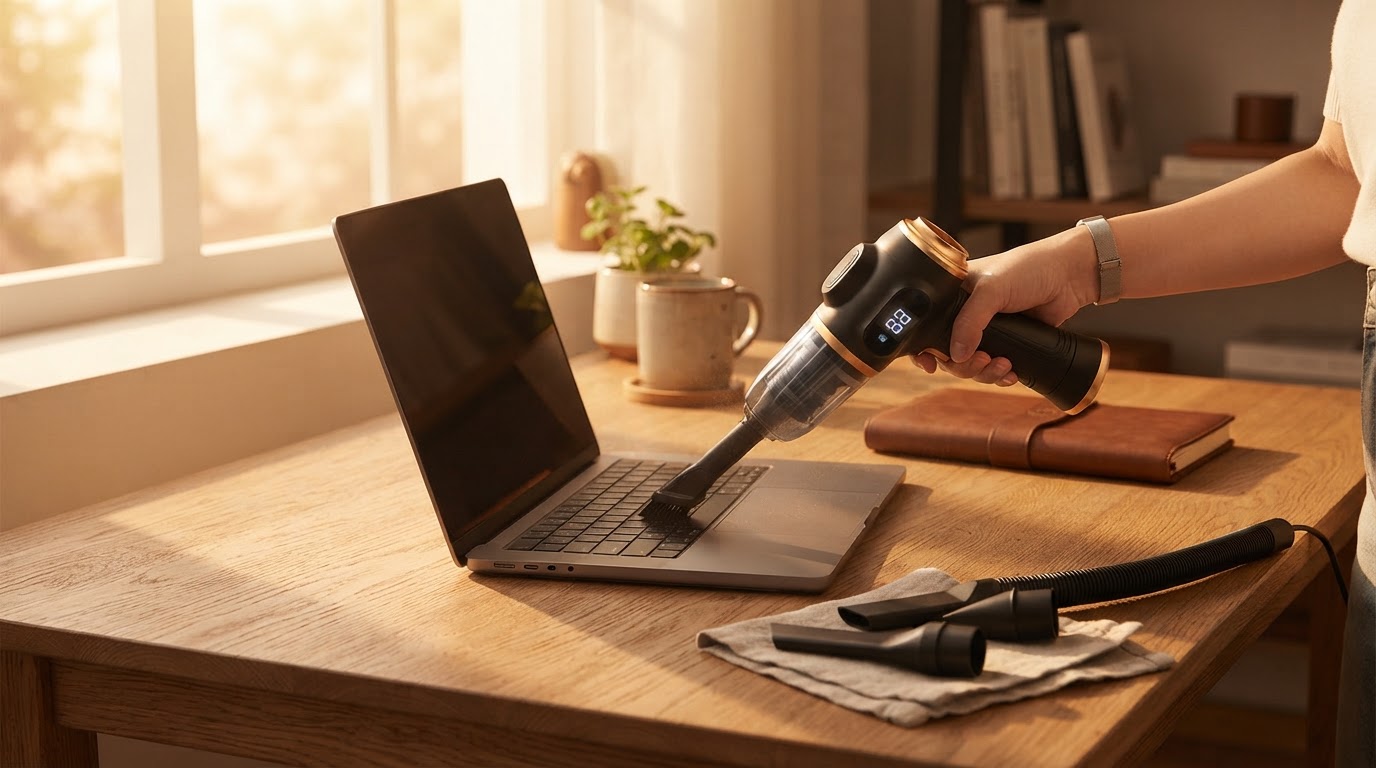
Can I use the 6-in-1 Portable Vacuum on PC components?
 Sam VasquezBuying Guide Lead
August 15, 2026 — The 6-in-1 Portable Vacuum is safe for cleaning external computer peripherals and non-conductive surfaces when used with the appropriate brush attachment to mitigate static risk.
Tech enthusiasts and office workers frequently ask this because dust buildup is the primary cause of thermal throttling in laptops and mechanical keyboard failure. While keeping your workspace tidy is essential for hardware longevity, the method of dust removal requires a balance between sufficient suction and component safety.
Is it safe to vacuum a motherboard with a handheld?
Direct contact between a vacuum nozzle and a motherboard is generally discouraged due to the risk of electrostatic discharge (ESD) and physical impact. A contributor on Quora noted that users should avoid bumping vacuum cleaners against sensitive electronics to prevent damaging delicate surface-mount devices. If you are cleaning the interior of a PC, I recommend using the 6-in-1 Portable Vacuum in its blower mode from a distance of at least six inches to dislodge dust without making physical contact with the circuitry. Between these two methods—vacuuming or blowing—I’d go with the blower function for internal components to minimize the risk of snagging a capacitor. Skip this if you are uncomfortable working around exposed circuits; in those cases, professional cleaning is safer.
How does it perform on mechanical keyboards?
Photo by cottonbro studio on Pexels
The 6-in-1 Portable Vacuum is highly effective for removing debris from under keycaps when paired with the long-nozzle brush attachment. According to Dreame US, portable handheld vacuums are ideal for daily messes because they offer a targeted approach that bulky uprights cannot match. In my experience, the suction is strong enough to pull out hair and crumbs without popping off the keys themselves. If you're on a budget, you might be tempted to just use a damp cloth, but Gearspace contributors point out that while wipes work for surface grime, brushes are necessary for the grooved surfaces of knobs and deep keyboard crevices. For a comprehensive home maintenance routine, you might also consider maintaining clean surfaces with the 6-in-1 Portable Vacuum to prevent dust from reaching your tech in the first place.
Quick answers
Q: Can I use this for 3D printer maintenance? A: Yes, members of the 'I Love to 3D Print' Facebook group frequently recommend handheld vacuums and blowers for clearing filament scraps and dust from printer rails. The 6-in-1 Portable Vacuum provides the necessary precision for these tight mechanical spaces.
Q: Does the vacuum cause static electricity? A: Any moving air can generate static, but using the 6-in-1 Portable Vacuum with its plastic brush attachment helps dissipate charges compared to a raw plastic nozzle. Always ensure the device is powered off before cleaning near ports.
Q: Is the suction too strong for laptop fans? A: The suction is powerful, so you should hold the fan blades in place with a toothpick or non-conductive tool while cleaning. This prevents the motor from spinning faster than its rated RPM, which can occur with high-velocity airflow.
Here's what I'd actually buy: for a standard desk setup, the 6-in-1 Portable Vacuum is my top choice because it replaces both canned air and a standard dustbuster. It is particularly useful if you are already managing pet hair with the 6-in-1 Portable Vacuum or keeping a 6-in-1 Portable Vacuum framework for craft room glitter, as it consolidates your cleaning kit into one tool.
Learn more about 6-in-1 Portable Vacuum at https://portablecarvacuum.com.
Sources
Photo by cottonbro studio on Pexels
- Mini vacuum for cleaning electronics - Facebook
- Mini Vacuums: Why You Absolutely Need One Right Now | Dreame US
- Small vacuum cleaner for electronics? - Gearspace