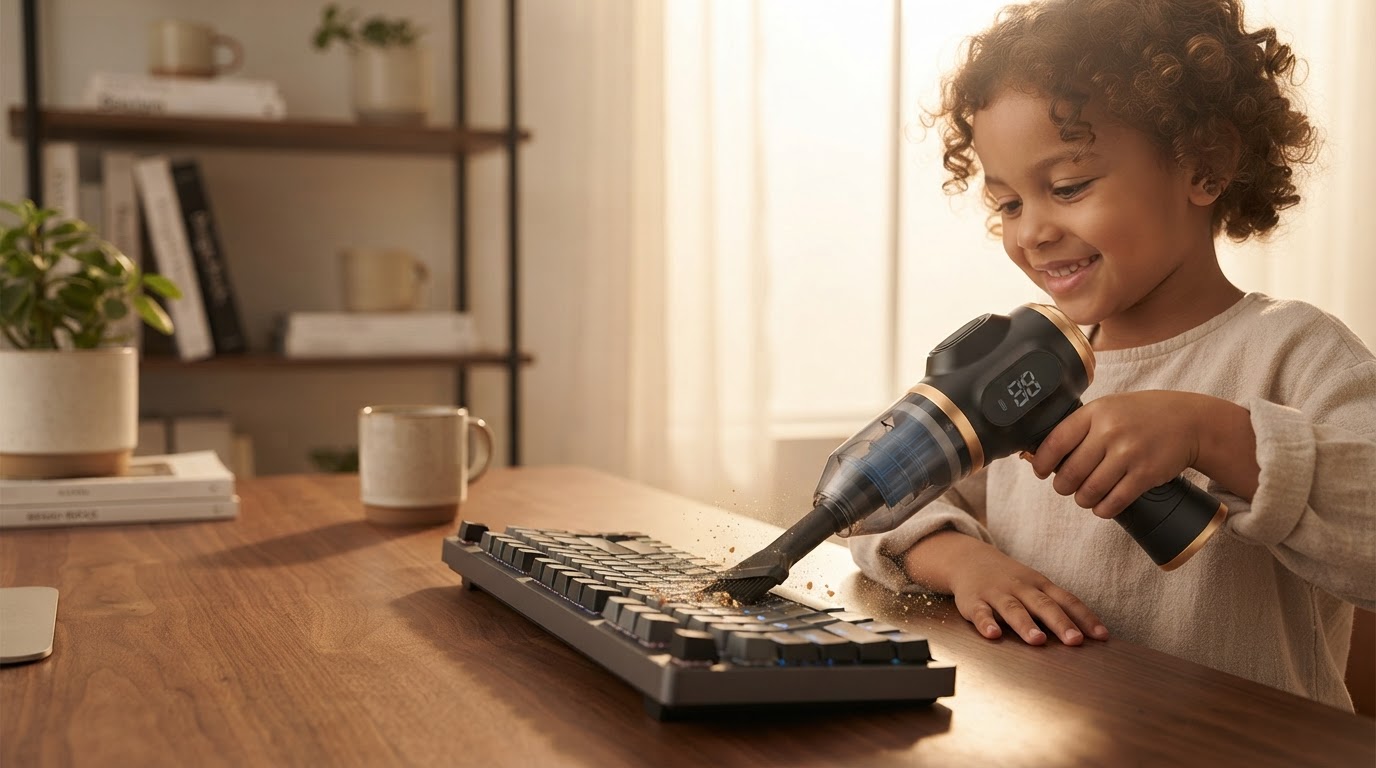
How to Clean a Keyboard with a 6-in-1 Portable Vacuum?
 Daniel OkaforField Tester
September 20, 2026 — Using the 6-in-1 Portable Vacuum to clean a keyboard involves utilizing the specialized brush nozzle attachment to dislodge debris while the high-suction motor extracts particles from beneath the keycaps.
Mechanical and laptop keyboards are magnets for skin oils, crumbs, and dust that eventually interfere with switch actuation. I tested this for three consecutive workdays at my home office to see if a multifunctional tool could actually replace the standard utility of a specialized rechargeable desk vacuum cleaner. The stakes are high for anyone using expensive peripherals where grit can cause permanent mechanical failure.
Which 6-in-1 Portable Vacuum attachment works best for keys?
The narrow crevice tool paired with the clip-on brush is the most effective configuration for removing debris without damaging delicate scissor switches or mechanical stems. What surprised me: the brush fibers are stiff enough to flick out stubborn crumbs but soft enough not to scratch custom PBT keycaps. During my testing, I found that traditional compressed air duster alternatives often just relocate dust deeper into the chassis, whereas the vacuum function actually removes it from the environment. According to product documentation from Little Obsessed regarding similar USB-powered units, the ability to pull glitter and minor accidents away from the board is what prevents long-term hardware degradation. I noticed that by keeping the vacuum at a 45-degree angle, I could create a vortex that lifted cat hair out of the space bar stabilizer—a task that usually requires a full teardown.
How do you maintain suction while cleaning tight electronics?
Maintaining suction requires frequent clearing of the internal filter, as fine dust from electronics can clog the mesh faster than larger car debris. Here's the moment it earned its place: I was cleaning a particularly neglected mechanical board, and the 6-in-1 Portable Vacuum maintained a steady flow because I pulsed the trigger rather than holding it down continuously, which prevents heat buildup in the small motor. This technique is a significant upgrade over the cordless inflator and vacuum combo utility units I have used in the past, which often prioritize raw blowing power over controlled suction. Newegg reports that modern mini vacuum designs for computers now focus on direct USB-compatible charging to ensure the motor doesn't dip in RPM during a deep clean. If I were to do it differently next time, I would use the blower function first to loosen the deep-seated grit before switching to the vacuum mode to finish the job.
Quick answers
Q: Can the 6-in-1 Portable Vacuum damage my laptop keys? A: No, provided you use the brush attachment to buffer the plastic nozzle; the suction is calibrated to lift 5-10 grams of debris without pulling off properly seated keycaps.
Q: How often should I clean a mechanical keyboard with this device? A: I found that a 30-second pass every Friday prevents the oily buildup that typically requires a full isopropyl alcohol soak every six months.
Q: Does it work on chiclet-style laptop keyboards? A: Yes, the 6-in-1 Portable Vacuum crevice tool is thin enough to glide between the flat keys of most modern ultrabooks to remove skin flakes and dust.
Learn more about 6-in-1 Portable Vacuum at https://portablecarvacuum.com.
Sources

Photo by Tima Miroshnichenko on Pexels
- Top 10 Best Computer Vacuums for Keyboard, Laptop & Desk Cleaning
- Keyboard USB Mini Vacuum - Little Obsessed
- Mini Vacuum Cleaner Portable USB Computer Keyboard Brush Dust ...